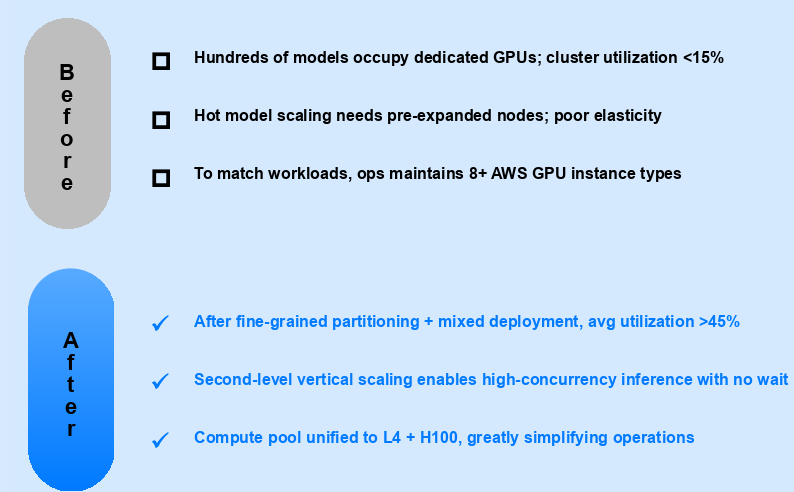
A Leading Enterprise Collaboration Platform: Cutting GPU Inference Costs by 58–65% Across Global Regions
With 20+ business lines and 100+ AI models across 10+ regions, a leading enterprise collaboration platform used TensorFusion to achieve fine-grained GPU management and 58–65% inference cost reduction while maintaining 40% peak-hour headroom.
This customer migrated its AI inference workloads to TensorFusion and achieved 58–65% inference cost reduction while maintaining 40% GPU headroom during peak business hours—with significantly improved elastic scaling capabilities.
About the Customer
This customer has evolved from a video conferencing tool into a comprehensive B2B collaboration platform. At peak, the platform handles over 100,000 meetings and calls per second, alongside email, messaging, documents, and calendar services. Each business line relies on distinct AI models to power its intelligent features.
| Dimension | Detail |
|---|---|
| Infrastructure | Multi-cloud (AWS / Azure / OCI) + on-premise data centers |
| Business lines | 20+ |
| AI models in production | 100+ (open-source, fine-tuned, and custom-trained) |
| Model types | Text, speech, image — spanning traditional deep learning and Transformer architectures |
| Deployment regions | 10+ globally |
The Core Problem: GPU Costs Were Scaling Linearly with Model Count
As AI capabilities expanded across business lines, the customer faced not a single-model compute problem, but a systemic cost challenge rooted in how GPUs were allocated and provisioned.
Whole-GPU allocation created massive fragmentation
Under the traditional model, every workload—regardless of actual need—received an entire GPU. A lightweight speech model using 2 GB of VRAM and a large Transformer requiring 40 GB both consumed one full card. For platform engineering teams, this meant significant compute capacity sat idle while budgets showed constant growth.
Every new model meant new GPU procurement
Each business team launching a new model needed dedicated GPU resources. As the model count grew from dozens to over 100, infrastructure costs grew almost linearly. There was no shared compute layer to absorb new workloads at marginal cost—every AI feature expansion triggered a new procurement cycle.
Multi-region deployment multiplied the waste
The same fragmentation problem repeated in every region. A model deployed to 10+ regions carried 10× the allocation inefficiency. What might be manageable at single-region scale became a serious cost driver across the customer's global footprint.

Migration Strategy: Deep Analysis, Compatibility First, Gradual Rollout
TensorFusion did not take a "rip-and-replace" approach. The team designed a three-phase migration tailored to the customer's complex, multi-cloud environment.
Phase 1 — Workload-by-Workload Profiling
Before touching any infrastructure, TensorFusion conducted a granular assessment of every model's actual compute and memory requirements. Workloads were classified by pattern—real-time inference, batch processing, or low-frequency invocation—and traffic profiles were mapped per region.
Not every workload migrates at the same pace. This profiling determined the migration sequence and set realistic savings expectations for each stage.
Phase 2 — Compatibility Mode for Safe Coexistence
Migration could not disrupt production. TensorFusion achieved full compatibility with the existing NVIDIA Operator and Device Plugin—GPUs already allocated to legacy workloads remained untouched. Migrated and unmigrated applications coexisted safely on the same node pool, eliminating the need for a hard cutover.
Phase 3 — Region-by-Region, Traffic-Percentage Gradual Cutover
Rather than a single switch, migration proceeded region by region, with traffic shifted incrementally within each region. Any anomaly could be rolled back immediately—risk stayed fully controlled throughout.
Engineering Challenges Solved: Swapping Engines Mid-Flight
In a large-scale gradual migration, the hardest part isn't deploying the new system—it's managing the boundary conditions when old and new systems run side by side.
Bidirectional Scheduling Isolation
During the coexistence period, TensorFusion-managed Pods and legacy Device Plugin Pods ran on the same node pool simultaneously. Both directions of conflict had to be resolved:
- Forward: Report existing Device Plugin allocation data to the scheduler's filter stage, preventing TensorFusion from scheduling onto already-occupied GPUs.
- Reverse: Prevent unmigrated GPU Pods from being scheduled onto GPUs now managed by TensorFusion.
A failure in either direction would impact production workloads—this is what "swapping engines mid-flight" means in practice.
GPU Driver Hot-Upgrade Compatibility
TensorFusion implemented awareness of GPU Operator Hot Upgrade Driver events, ensuring that driver hot-updates don't cause running workloads to lose visibility of CUDA devices—a real risk during rolling infrastructure updates.
Batch Migration Tooling
A custom AdmissionWebhook with intelligent allow/block list policies enabled business teams to migrate GPU workloads in bulk—by namespace, label, or other dimensions—without manually reconfiguring individual Deployments. This turned a potentially months-long per-app migration into a systematic, team-by-team operation.
Joint LLM Inference Optimization
Beyond infrastructure, TensorFusion and the customer's engineering team jointly optimized the end-to-end LLM inference pipeline:
- Prefill-Decode disaggregation (PD separation) to boost large model throughput
- vLLM-layer configuration tuning
- Multiple KV Cache reuse strategies tested and deployed
- GPU instance type benchmarking under real production workloads
- Smooth conversion of existing timeslicing tenants to TensorFusion
Deep Observability Integration
Metrics format was customized to the customer's internal monitoring stack, with business-dimension labels added for seamless integration with existing observability platforms.
Results
Real production data from one region: migration began in September. While maintaining 40% GPU headroom during peak business hours, costs dropped by 58%. Across other regions, savings reached up to 65%.

| Metric | Before | After |
|---|---|---|
| GPU inference cost | Baseline | 58–65% reduction |
| GPU allocation model | Whole-GPU, high fragmentation | Fine-grained slicing, on-demand allocation |
| Cost of adding new models | Near-linear growth | Shared compute pool, marginal cost approaching zero |
| Elastic scaling | Manual, slow response | Three modes, Karpenter-integrated, fully automated |
| Peak-hour GPU headroom | Unpredictable | 40% headroom guaranteed |
| Migration risk | — | Region + traffic-percentage gradual rollout, instant rollback |
Elastic Scaling — Three Modes, Fully Automated
TensorFusion supports three node scaling modes with deep Karpenter integration, turning elastic scaling into real cost savings:
| Mode | Use Case |
|---|---|
| Direct EC2 API scaling | Calls EC2 API via AWS IAM Role (IRSA) for rapid node provisioning |
| Managed Karpenter CR | Creates NodeClaim objects pointing to GPU Pool managed nodes; TensorFusion fully manages node lifecycle |
| Reuse existing Karpenter CR | Selects and replicates suitable NodeClaims, letting Karpenter handle dynamic bin-packing and idle node reclamation—minimal infrastructure footprint |
Common Questions
"Does GPU virtualization add latency to inference?" TensorFusion's virtualization operates at the driver level with near-zero overhead. In the customer's production environment, inference latency remained within pre-migration baselines. For latency-sensitive real-time models (speech, video processing), this was validated before any traffic was shifted.
"How disruptive is the migration process?" The three-phase approach is specifically designed to avoid disruption. Compatibility mode means existing workloads are never touched. Traffic is shifted incrementally per region with instant rollback capability. The customer's production services experienced no downtime during migration.
"Does this require replacing our NVIDIA stack?" No. TensorFusion's compatibility mode works alongside the existing NVIDIA Operator and Device Plugin. Migrated and unmigrated workloads coexist on the same nodes. There is no requirement to remove or replace existing GPU management tooling.
Why This Customer Chose TensorFusion
The customer's core challenge was structural: over 100 AI models across 20+ business lines and 10+ regions, each allocated whole GPUs regardless of actual demand. Cost scaled linearly with model count—and no amount of manual tuning could fix the underlying allocation model.
TensorFusion addressed this at the right layer. Fine-grained GPU slicing eliminated fragmentation. A shared compute pool absorbed new models at near-zero marginal cost. And a gradual, region-by-region migration path meant production was never at risk.
For organizations running diverse AI workloads across multiple teams and regions—where GPU cost growth tracks model count rather than actual compute demand—this is the pattern worth evaluating.
Sign in to continue reading
This is premium content. Sign in to your account to access the full content.
Author

Categories
More Posts

Public Safety Video Analytics at City Scale with Elastic GPU Resources
A public safety case study using pooled GPU resources to reduce response latency and improve utilization across city-wide video systems.
AI Infra Partners: Building a Federated Compute Network with SLA Control
A customer story on federating GPU supply across clusters while keeping SLAs, data locality, and operations sane.

Building Always-On GPU Labs for Education Without Always-On Costs
A case study on how a regional education network pooled GPU resources to serve AI courses with predictable performance and 70% lower cost.
Newsletter
Join the community
Subscribe to our newsletter for the latest news and updates